
Plan View is the place that enables user to define insurance plans related to the exiting carriers (Insurance Companies).
In order to access the Insurance Plan View, follow the following:
- Press on your name at the upper right side and select “Settings”.

- Expand "Insurance" menu and select "Plan"
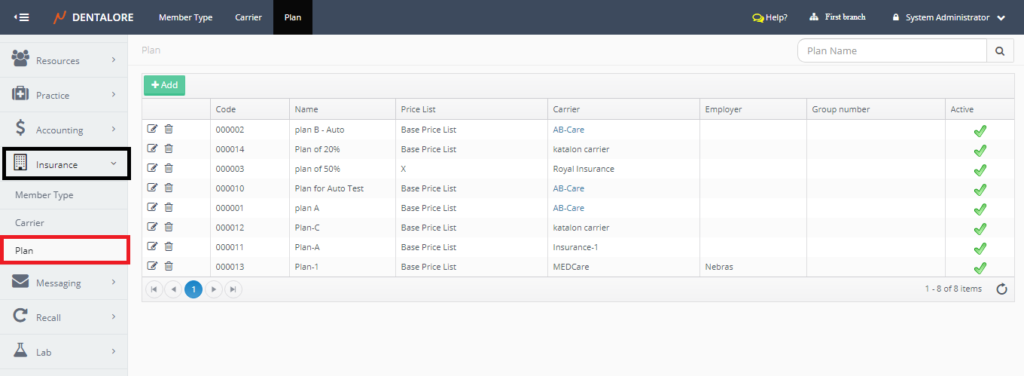

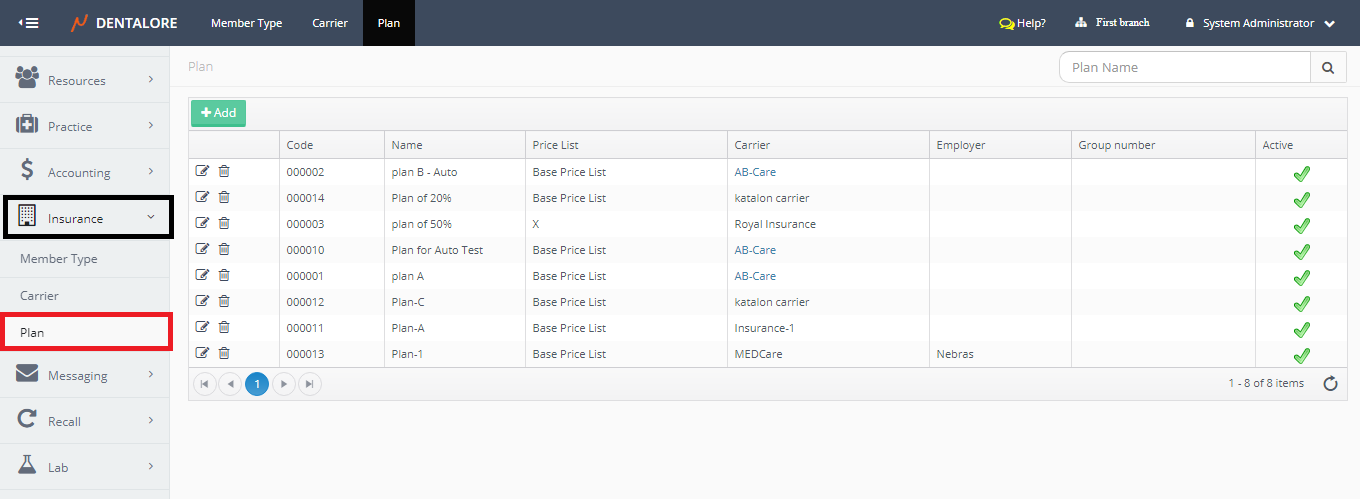
'Plan' Main Page opens that contains the following:
1- Search Area
User has ability to search for a specific insurance plan from the Search box at the upper right side of the page using the "Plan Name".
2- Plans Grid View
Plans grid view contains all of the defined insurance plans and an "Add" button to add new plans.
For more information about configuring new insurance plans, Check: Add New Insurance Plans.
- Columns of Plan grid view respectively are:
- Transactions Column
Contains 2 actions that could be performed on the Plan:
- "View": When Pressed, User will be directed to the 'Edit Insurance Plan' Page.
- "Delete": When Pressed, Popup "Delete Plan" opens to confirm or cancel the deletion of selected plan. - Code
- Is the unique code (ID) for each insurance plan - Name
- Is the insurance plan's name. - Price List
- Is the name of price list that the insurance plan is based on it for procedures' prices. - Carrier
- Is the name of the insurance company (Carrier) in which the insurance plan is related to it.
>> Note that for the carriers that has a website added for them, the carrier's name is displayed clickable and in blue color that once pressed, you will be directed to the added website. - Employer
- Is the name of employer that the Insurance Plan related to. - Group Number
- Is....... - Active
- Is the column that displays if the plan is active or inactive. In which active plans could be used and selected for patients to be treated by while inactive can't be used.