
Introduction
Daily Production Report:
- Is Only displayed for Procedure Ledger type clinics.
- Displays the provider’s daily production all over branches (Per clinic).
>> Note that: “Daily Production” report works on the (Patient Payments) only, so that (Insurance Payments) are NOT taken in consideration here.
(Daily Production) report could be accessed from:
- Analytics >> Financials >> Daily Production.
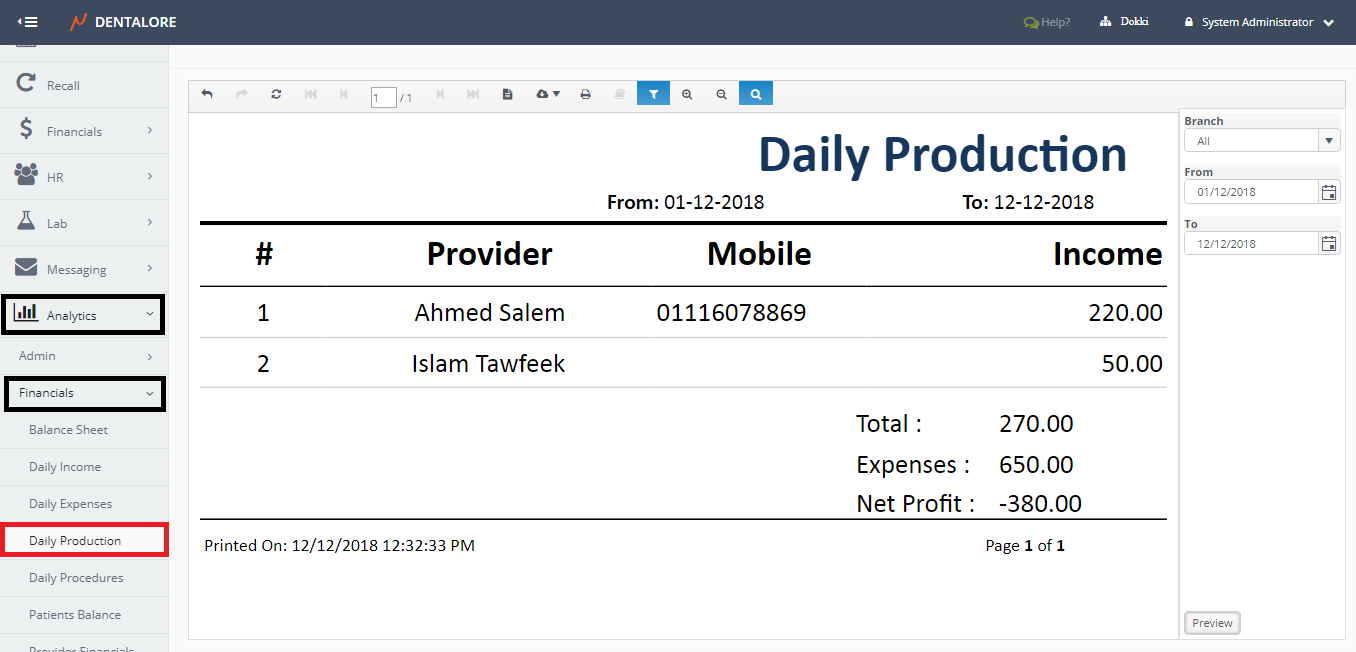
Filtration
- Branch
- Is a drop down menu that contains all of the defined branches in your clinic with default selection: All. - Date Range
- (From) and (To) fields enables user to select the required date range.
- Date filtration depends on the Payment Transaction Date of patient payments.
- Default Selection: Today’s Date.
Content
Daily Production data are displayed in a grid view whose columns are:
- #
- Displays serial number for the listed records in the grid view. - Provider
- Displays the name of providers who achieve production values for the clinic. - Mobile
- Displays the mobile number of the provider. - Income
- Displays the total amount of income that each provider made within the selected date range.
At the grid view’s footer the following total values are displayed:
- Total
- Displays the total amount of income that all providers listed in the report made within the selected date range. - Expenses
- Displays the total amount of expenses of your clinic within the selected date range. - Net Profit
- Displays the value of subtracting (Total) from (Expenses).
>> Net Profit = Total - Expenses